The five fastest levers to improve your local visibility right now are: verify your profile, select the most specific primary category available, complete every NAP field (name, address, phone), set accurate hours, upload at least 10 current photos, and activate a steady review-request workflow. Do those five things before anything else, and you will have addressed the majority of what separates a Map Pack contender from a profile that sits invisible on page three.
Here is your immediate action checklist:
- Verify or claim your profile at Business — unverified profiles cannot rank
- Set your primary category to the most specific option Google offers (e.g., “Physiotherapy Clinic,” not “Health”)
- Complete NAP and hours including statutory Canadian holidays and any seasonal exceptions
- Add 10 or more recent photos covering exterior, interior, team, and service-in-action shots
- Enable booking or call-to-action buttons so customers can act directly from the profile
- Set up a review-request workflow using email, SMS, or QR codes at point of service
- Schedule your first Google Post for this week and commit to weekly publishing
Every step in this guide builds on that foundation, with a complete field-by-field checklist, ready-to-use templates, and a week-by-week 30-day plan written specifically for Canadian businesses.
Key takeaways
A fully optimised Google Business Profile requires consistent engagement, not just a one-time setup — primary category, review velocity, and weekly activity are the three levers that move Map Pack rankings in 2026.
| Point | Details |
|---|---|
| Verify and categorise first | Verification and primary category selection unlock Local Pack eligibility before any other edit matters. |
| Complete NAP and hours precisely | NAP consistency across your profile, website, and directories is a major prominence signal; update special hours for every Canadian statutory holiday. |
| Aim for 70-word descriptions and 200+ reviews | Top-ranking profiles tend to use descriptions around 70 words and carry 200 or more reviews, per a 2025 analysis. |
| Post weekly and respond within 48 hours | Engagement metrics are now first-class ranking signals; consistent small actions compound faster than one-off optimisation pushes. |
| Marketing Guardians manages the full cycle | Marketing Guardians offers subscription-based local SEO and GBP management for Canadian businesses, covering everything from profile setup to monthly reporting. |
Table of Contents
- How does Google rank local results, and which GBP signals matter most?
- What does a complete GBP optimisation checklist look like?
- What photos and posts actually earn clicks on your profile?
- How do you earn more Google reviews and respond effectively?
- Which advanced GBP features are available to Canadian businesses?
- Which Google Business Profile Insights should you track?
- How do you verify your profile and recover from a suspension?
- Your 30-day GBP optimisation plan, week by week
- What Canadian local SEO actually teaches you about GBP wins
- Marketing Guardians makes managed GBP optimisation straightforward
- Sources
- FAQ
How does Google rank local results, and which GBP signals matter most?
Local results rest on three pillars: relevance, distance, and prominence. Relevance measures how well your profile matches what someone searched; distance is how far your location is from the searcher or the location they specified; prominence reflects how well-known and trusted your business appears based on signals across the web. A complete, accurate Google Business Profile feeds all three simultaneously.
Which fields feed which pillar:
- Relevance: primary category, secondary categories, business description, services/products list, and keyword context in posts and Q&A
- Distance: verified address or accurately configured service-area settings, which allow Google to calculate proximity correctly
- Prominence: review quantity and velocity, owner response rate, photo count and recency, NAP consistency across directories, website authority, and engagement signals (click-through rate, calls, direction requests)
The 2026 update to how prominence is weighted is the most consequential shift in recent years. Engagement metrics, specifically click-through rate from search results, dwell time on your profile, and review activity over rolling 90-day windows, now carry significantly more weight than they did in prior years. A profile that earns consistent weekly interaction outperforms one that was perfectly filled out once and then left static.
Pro Tip: Choosing the right primary category is the single biggest on-profile lever for Local Pack eligibility. A plumbing company that selects “Plumber” instead of the broader “Contractor” will appear for far more relevant queries. Never add keywords to your business name to compensate for a weak category choice — Google treats that as a policy violation and it can trigger suspension.
Understanding how GBP engagement signals feed AI-driven local answers is increasingly relevant as Google surfaces more AI-generated local summaries in search results. Profiles with strong engagement data are more likely to be cited in those summaries.
What does a complete GBP optimisation checklist look like?
The recommended sequence is: verification first, then primary category, then NAP and hours, then services and products, then description, then photos and videos, then attributes, then booking and call-to-action features, then posts, then Q&A, then reviews, and finally citations and linking. Each step unlocks the next.
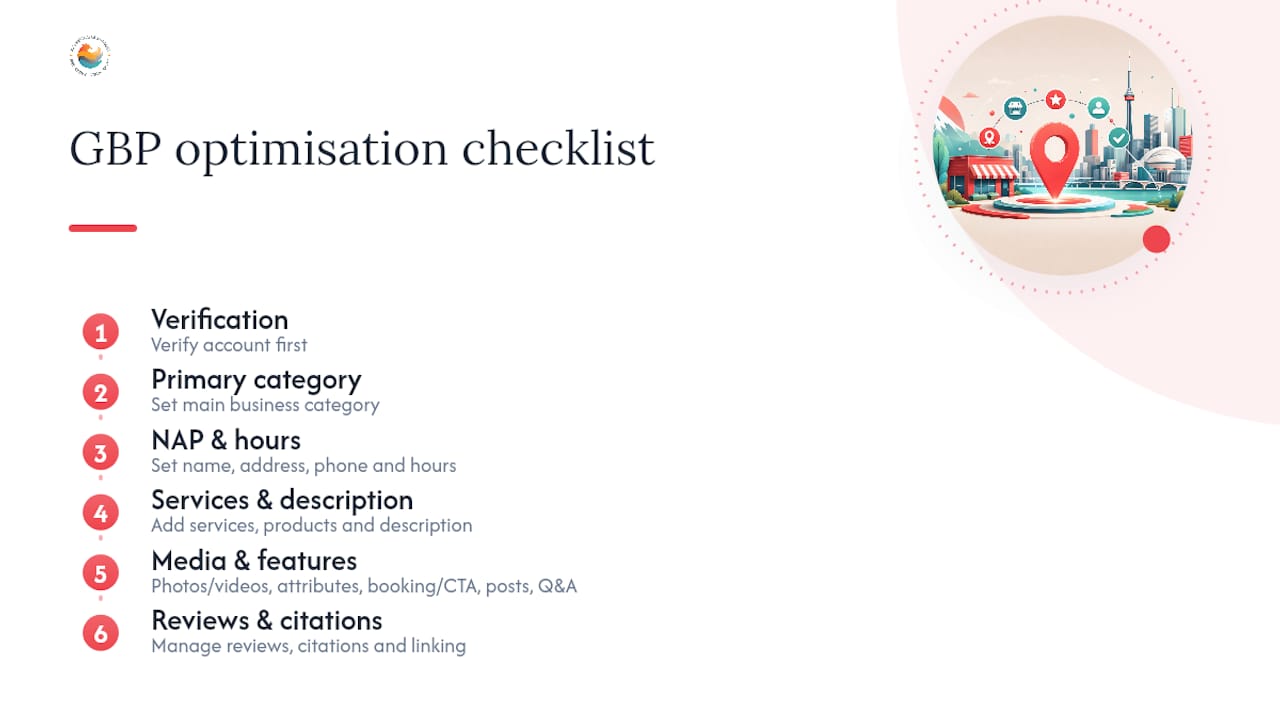
Verification
Verification is the prerequisite for everything. Without it, your edits may not appear publicly and you cannot access Insights. Canadian retail businesses typically verify by postcard (5–7 business days to a Canadian address), though phone, email, and instant verification are available depending on your business type and history. Service-area businesses should not list a home address; configure your service area by city, region, or postal code instead.

Primary category and NAP
Select the most specific primary category available. Add secondary categories only when they genuinely describe a distinct service you offer. Then confirm your business name matches your signage and legal registration exactly, your phone number is a local Canadian number (not a toll-free redirect), and your address matches Canada Post formatting.
Hours and special hours
Set your regular hours accurately, then add special hours for every Canadian statutory holiday. Google prompts you to confirm holiday hours; leaving them blank can suppress your profile on high-traffic days. If your hours change seasonally (common for tourism, landscaping, or retail businesses), update them at least one week in advance.
Business description template
Aim for 50–80 words. Top-ranking profiles tend to use descriptions around 70 words, and that analysis also found high-visibility businesses often carried 200 or more reviews. Here is a working template:
Services and products
List every core service with a name, short description (1–2 sentences), and price range where applicable. For product-based businesses, add individual product entries with photos and prices. This content feeds relevance signals and gives Google structured data to surface in search results.
Attributes
Attributes communicate trust and accessibility. Tick every attribute that applies: wheelchair accessibility, payment types accepted (Interac, credit, cash), LGBTQ+ friendly, women-owned, veteran-owned, and any health or safety attributes relevant to your sector. Canadian searchers increasingly filter by accessibility and payment type.
Pro Tip: Export your current profile data from the Business Profile dashboard monthly and paste it into a simple spreadsheet. Compare it against your website’s contact page and your listings on Yellow Pages Canada, Yelp Canada, and the BBB. Any mismatch in NAP is a prominence signal you are leaving on the table.
What photos and posts actually earn clicks on your profile?
Photos and Google Posts are the most visible engagement levers on a profile, and they work together. A profile with recent photos and active posts signals to Google that the business is operating and engaged, which feeds the prominence pillar directly.
Photos that perform
- Exterior shots: at least two, taken from the street angle a customer would approach from, in daylight
- Interior shots: two to four images showing the space customers will experience
- Service or product in action: the highest-performing category for click-through; show real work, not stock imagery
- Team photos: one or two professional but approachable images build trust before a customer calls
- Before-and-after: particularly effective for trades, aesthetics, landscaping, and renovation businesses
Aim for 10–15 images total, refreshed quarterly. Google weights recency, so a profile with 30 photos uploaded three years ago will often underperform one with 12 photos uploaded in the past six months.
Video
Short videos (30–90 seconds) showing a service walkthrough, a quick tour of your space, or a completed project perform well. Keep file sizes under 75 MB and shoot in landscape orientation. One new video per quarter is a realistic and effective cadence for most small businesses.

Google Posts: types and cadence
Google offers three post types: Update (general news or tips), Offer (time-limited promotions with a start and end date), and Event (for workshops, open houses, or community events). Post at least once per week. Weekly posts keep profiles fresh and provide additional keyword context that Google uses to assess relevance.
Three post templates you can use this week:
Promotion post:Event post:Product highlight post:Pro Tip: Before uploading photos, rename the file to something descriptive: “toronto-physiotherapy-clinic-reception.jpg” rather than “IMG_4821.jpg.” While Google does not publicly confirm that filenames influence ranking, descriptive filenames are consistent with best practices for image SEO and cost nothing to implement.
How do you earn more Google reviews and respond effectively?
Review signals — quantity, quality, and velocity — are major prominence signals and correlate directly with higher local visibility. A consistent flow of reviews over a rolling 90-day window outperforms a one-time burst, so the goal is a repeatable workflow, not a campaign.
A compliant review-request workflow
Google prohibits incentivising reviews (offering discounts or gifts in exchange), so keep requests simple and genuine.
- Email: send a follow-up 24–48 hours after service completion with a direct link to your review page. Subject line: “How did we do, [first name]?”
- SMS: a short message works well for trades and service businesses. Example: “Hi [name], thanks for choosing [business]. If you have a moment, we would love your feedback: [link]”
- QR code: print a small card or add a sticker near your checkout or reception desk. Link it directly to your Google review form.
- Receipts and invoices: add a one-line request and the short review link to the bottom of every invoice or receipt.
Response templates
Positive review:Negative review: Never argue with a negative review publicly. Acknowledge, move the conversation offline, and follow up once resolved.
Handling fake or policy-violating reviews
If a review violates Google’s policies (spam, fake identity, conflict of interest, or off-topic content), flag it directly from the Business Profile dashboard using the “Report review” option. Document the review with a screenshot before reporting. Google’s review removal process can take several weeks; if the review remains after escalation, respond professionally to limit its impact on prospective customers.
Q&A moderation
Pre-populate your Q&A section with the five to eight questions your staff answers most often: parking, hours, payment types, service area, booking process. Answer each question yourself using your Google account. Check the Q&A section weekly, because anyone can post a question and anyone can post an answer — including competitors or misinformed customers.
Pro Tip: With the reviewer’s implicit permission (they posted publicly), you can screenshot a positive review and share it as a social post or add it to a testimonials page on your website. Crop out the reviewer’s profile photo and use only their first name and last initial to respect privacy norms, and never alter the text of the review.
Which advanced GBP features are available to Canadian businesses?
Not every Google Business Profile feature is available in every market or to every business type. Here is what Canadian businesses can currently access and what the eligibility rules look like.
- Products: available to most retail and product-based businesses. Add individual items with photos, descriptions, and prices. Service-area businesses and some regulated professions (e.g., law firms, medical clinics) may not see this feature.
- Services: available to service-based businesses. List each service with a name, description, and optional price. This is the primary structured-data lever for businesses that do not sell physical products.
- Bookings: available where Google has an integration with a supported booking platform (e.g., Jane App, Mindbody, Acuity Scheduling). If your booking software is not integrated, use the “Appointment URL” field to link directly to your booking page.
- Messaging: available in Canada. Customers can message you directly from your profile. Enable it only if someone on your team can respond within a few hours; Google tracks response time and will disable the feature if responses are consistently slow.
- Merchant Center link: available for Canadian e-commerce businesses. Linking your Google Merchant Center account allows product listings to appear in Shopping results alongside your profile.
For service-area businesses (plumbers, electricians, cleaners, landscapers), the key rule is to configure your service area accurately using cities or postal code regions rather than a physical address. Accurate service-area settings help Google calculate proximity correctly and reduce the risk of suspension for businesses that operate from a home address.
Regulated professions in Canada, including healthcare providers, legal professionals, and financial advisers, should review their provincial regulatory body’s guidelines before enabling messaging or booking features, as some provinces have specific rules about how client communications must be handled.
Which Google Business Profile Insights should you track?
Google Business Profile Insights (accessible from the Business Profile dashboard) gives you a direct read on how your profile is performing. The metrics that matter most for a small business dashboard are:
- Total views: how many times your profile appeared in Search and Maps. A rising trend here confirms your relevance and prominence signals are working.
- Search queries: the actual terms people used to find you. Split between “direct” (your business name) and “discovery” (category or service terms). Growing discovery impressions means your category and description are doing their job.
- Actions: calls, direction requests, and website clicks. These are the conversion metrics. If views are rising but actions are flat, your profile may need stronger photos, a clearer description, or more reviews to build trust.
- Photo views: how often your photos are viewed relative to similar businesses. A low ratio here is a clear signal to add more recent images.
- Bookings and messages: if you have these features enabled, track volume and response time monthly.
Reporting cadence and KPI examples
Check Insights weekly for anomalies (a sudden drop in calls often signals an hours error or a suspension warning). Run a full monthly report and annotate it with what you did that month: new posts, a promotion, a review push, or a local event. That annotation layer is what turns raw data into a learning loop.
A simple small-business KPI set:
- Discovery impressions: target month-over-month growth
- Actions-to-views ratio: a rising ratio means the profile is converting attention into contact
- Review velocity: aim for at least two to four new reviews per month for most local businesses
- Response rate: 100% of reviews responded to within 48 hours
Export your Insights data quarterly and save it. Google’s dashboard shows only a rolling window of data, so historical exports are the only way to track year-over-year trends.
How do you verify your profile and recover from a suspension?
Verification options for Canadian businesses
Google offers four verification methods, and availability depends on your business type and history:
- Postcard: the default for most new listings. Google mails a postcard with a PIN to your business address. Delivery to Canadian addresses typically takes 5–7 business days. Do not make significant edits to your profile while waiting, as changes can trigger a new postcard.
- Phone: available for some business types. Google calls your listed number with a PIN.
- Email: available for some business types. Google sends a PIN to your business email.
- Instant verification: available if your business website is already verified in Google Search Console and the domains match.
Service-area businesses that do not serve customers at a physical address should select “I deliver goods and services to my customers” during setup and configure their service area rather than entering a street address.
Common suspension causes
- Business name contains keywords not in your legal or trading name (e.g., “Toronto Best Plumber Joe’s”)
- Address is a virtual office, UPS Store, or P.O. Box without a staffed physical presence
- Multiple profiles for the same location
- Repeated edits in a short window that trigger Google’s spam filters
- Spammy or inconsistent citations across directories
Reinstatement checklist
- Identify the likely cause using Google’s Business Profile Help policy documentation
- Gather supporting documents: business licence, utility bill, lease agreement, or government-issued registration showing your business name and address
- Correct the issue in your profile before submitting an appeal
- Submit a reinstatement request through the Business Profile support portal
- Allow 3–5 business days for an initial response; complex cases can take several weeks
- If the appeal is denied, request a live review from a Google support agent
Your 30-day GBP optimisation plan, week by week
This plan assumes one person is managing the profile, spending roughly 30–60 minutes per week after the initial setup. Adjust task ownership to your team size.
Week 1: foundation
- Claim or verify your profile at business.google.com
- Set your primary category (most specific available) and up to three relevant secondary categories
- Complete all NAP fields; confirm they match your website’s contact page exactly
- Set regular hours and add special hours for upcoming Canadian statutory holidays
- Write your business description (50–80 words using the template above)
- Upload at least five photos: exterior, interior, and one service-in-action shot
Week 2: content and engagement
- Add your full services or products list with descriptions and prices
- Enable booking links or add your appointment URL
- Tick all applicable attributes (accessibility, payment types, identity attributes)
- Publish your first Google Post (use the promotion or update template)
- Seed your Q&A section with five common customer questions and answer each
- Send your first batch of review requests to recent customers
Week 3: media, reviews, and citations
- Upload five additional photos; add one short video if available
- Respond to every review received so far (use the templates above)
- Open Insights and record your baseline: views, discovery impressions, actions, and photo views
- Audit your NAP across Yellow Pages Canada, Yelp Canada, the BBB, and your industry-specific directories; correct any mismatches
- Publish your second Google Post
Week 4: refinement and cadence
- Revise your business description if Insights shows low discovery impressions
- Schedule posts for the next four weeks using a simple content calendar
- Build a monthly review-request calendar: identify which customer touchpoints will trigger a request
- Set a recurring monthly reminder to export Insights data and annotate it
- Confirm your reporting cadence: weekly anomaly check, monthly full review
Pro Tip: The compounding effect of small repeated actions is real. Responding to reviews within 48 hours, posting weekly, and sending two to four review requests per week will outperform a single large optimisation push followed by months of inactivity. Engagement metrics now function as first-class ranking signals, so consistency is the strategy.
What Canadian local SEO actually teaches you about GBP wins
There is a pattern we see consistently in Canadian local search: the businesses that hold Map Pack positions month after month are rarely the ones with the most elaborate profiles. They are the ones that show up reliably. A weekly post, a review response within a day or two, a photo added after a completed project — these small, repeated actions compound in a way that a one-time optimisation sprint simply cannot replicate.
One anonymised example worth noting: a service-area business in a mid-sized Canadian city had a fully completed profile but had not posted in eight months and had stopped responding to reviews. A competitor with a less complete profile but consistent weekly posts and a 48-hour response rate to reviews overtook them in the Local Pack within about 90 days. The lesson is not that completeness does not matter — it does, especially for the relevance pillar. The lesson is that completeness without ongoing engagement is a starting point, not a finish line.
For Canadian businesses specifically, the service-area configuration is an underappreciated detail. Getting it right means Google can calculate proximity accurately for searches across your operating region, not just your postal code. And for businesses in regulated professions, taking the time to understand what your provincial body permits in terms of digital communications before enabling messaging or booking features will save you a compliance headache later.
Marketing Guardians makes managed GBP optimisation straightforward
Doing all of this yourself is entirely possible, and this guide gives you everything you need to start. The honest reality, though, is that maintaining weekly posts, monitoring reviews, auditing citations, and interpreting Insights data on top of running a business is where most owners fall behind. That is where Marketing Guardians comes in.
Marketing Guardians is a subscription-based digital marketing agency built for Canadian businesses that want consistent local search performance without hiring an in-house team. Our local SEO and GBP management services cover the full optimisation cycle: profile setup and verification, category and description strategy, review programme management, weekly posting, citation audits, and monthly Insights reporting. No long-term contracts, no one-size-fits-all packages. You get a dedicated team that understands your market and your goals, working on a recurring monthly plan that scales with your business. To see how we approach local search for Canadian businesses, visit our digital marketing services guide or reach out directly to book a free audit.
Sources
- Tips to improve your local ranking on Google - Google Business Profile Help
- Google Business Profile Optimization: Improve Local …
- What actually moves your Google Business Profile ranking in 2026 | Subscribe PR
- Google Business Profile Ranking Factors: Data-Driven Analysis (2026)
- How to Optimize Your Google Business Profile (Step-by-Step) | BitForward
FAQ
How do you fully optimise a Google Business Profile?
Follow the sequence: verify, set your most specific primary category, complete NAP and hours, add 10 or more photos, write a 50–80 word description, list your services or products, enable booking links, post weekly, and maintain a steady review-request workflow. Treat the profile as living data and update it whenever your business information changes.
What are Google Business Profile optimisation services?
These are managed services, offered by agencies like Marketing Guardians, that handle the ongoing work of profile setup, category strategy, review management, weekly posting, citation audits, and Insights reporting on behalf of a business owner.
How do I optimise my Google My Business page for better local ranking?
Start with primary category and complete NAP, since these feed relevance and distance directly. Then focus on review velocity and weekly posts, which drive the engagement signals that now carry significant weight in the prominence pillar. Respond to every review within 48 hours and audit your citations across Canadian directories quarterly.
What is the 80/20 rule in SEO, and does it apply to GBP?
In SEO, the principle suggests that a small number of actions drive the majority of results. For Google Business Profile specifically, primary category selection, profile completeness, and consistent review velocity account for the largest share of ranking movement. Getting those three right before investing time in secondary features reflects the same principle.
Recommended

AI search is changing fast. Download our Playbook to make sure you keep up.
Inside our AI Search and GEO Playbook, you’ll find a readiness checklist and a few copy-and-paste building blocks:
- Add Organization, Person, and Service schema to your About and Services pages.
- Add a short FAQ to your top service page with two or three real customer questions.
Small changes like these help AI systems understand who you are, what you do, and when to reference you.
Where to start if you feel behind? Just begin with one page - one question - one clear answer. Then open the Playbook and pick the next small step. Consistency beats intensity here. Your future self will be glad you started this month.


