A website maintenance plan is a documented schedule of security, backup, performance, content, and compliance tasks, each with an assigned frequency and a clear owner. For most small Canadian business brochure sites, a Basic monthly plan in a typical range for small business websites, or a structured in-house quarterly checklist, is a practical and sufficient starting point. If your site runs WooCommerce or processes payments, budget for a higher tier suitable for more active ecommerce sites.
Every plan, regardless of tier, should cover these five foundations from day one:
- Security updates: patch your CMS core, themes, and plugins as releases drop
- Backups: daily or weekly automated backups stored offsite, with regular restore tests
- Uptime monitoring: automated alerts the moment your site goes offline
- Core/CMS updates: scheduled compatibility testing before pushing updates live
- Monthly content and SEO check: review meta titles, broken links, and one content refresh
Canadian pricing typically includes tiers tailored for brochure sites, active blogs or light ecommerce, and high-traffic or WooCommerce stores with additional service guarantees. HST or GST applies on top of these figures depending on your province.
Key takeaways
A website maintenance plan is the single most cost-effective way to protect your site’s security, performance, and search visibility, and for most Canadian businesses, a Professional-tier managed plan at $150–$299 CAD/month covers every critical need.
| Point | Details |
|---|---|
| Start with security and backups | Daily backups and active security scanning are non-negotiable before any other maintenance task. |
| Match your tier to revenue at risk | Basic plans suit brochure sites; Professional suits active lead-gen or light ecommerce; Premium suits WooCommerce and high-traffic sites. |
| Use the 90-day checklist | The Day 0 inventory, 30-day security baseline, 60-day performance audit, and 90-day compliance review give you a structured launch. |
| Budget $3,000–$4,500 CAD/year all-in | A Professional-tier WordPress site in Canada, including taxes and incidentals, typically costs $3,000–$4,500 CAD annually. |
| Marketing Guardians | Offers subscription-based managed maintenance for Canadian businesses with no long-term contract, covering WordPress, WooCommerce, and Shopify. |
Table of Contents
- Why ongoing website maintenance matters for your business
- What should a website maintenance plan include?
- Sample maintenance plan tiers and realistic Canadian price ranges
- How do you choose between DIY, a freelancer, or a managed provider?
- What happens when your site is hacked or goes down?
- A copyable 90-day implementation plan
- How Marketing Guardians structures website maintenance for Canadian businesses
- What contract lengths and cancellation policies should you expect?
- Estimated total annual cost for a typical Canadian website
- A year-long maintenance timeline: how tasks sequence across 12 months
- The maintenance budget question most business owners get wrong
- Marketing Guardians’ managed maintenance plan: what you get from day one
- Sources
- FAQ
Why ongoing website maintenance matters for your business
A neglected site is not a neutral asset. It is an active liability. Downtime costs you leads, search rankings, and customer trust simultaneously, and the compounding effect is faster than most business owners expect.
The security risk alone justifies a maintenance budget. Unpatched plugins and outdated CMS versions are the most common entry points for attackers. CISA’s guidance on secure configuration and patching identifies these as the foundational mitigations that reduce the likelihood of compromise, and the OWASP Top Ten gives you the specific vulnerability categories to scan for at every maintenance cycle. A single successful breach can mean days of downtime, data exposure, and a Google “deceptive site” warning that tanks organic traffic for weeks.

Performance and user experience are equally consequential. Mobile devices account for roughly half of all website traffic, which means a slow mobile experience is not a minor inconvenience. It is a conversion problem. Google’s Core Web Vitals directly influence search rankings, and a site that fails those thresholds loses visibility before a potential customer ever sees it.
The business case is straightforward:
- Lost leads: a site that is down or slow during a paid campaign wastes every dollar you spent driving traffic to it
- Brand trust: an outdated copyright year, a broken contact form, or a security warning signals to visitors that no one is minding the store
- SEO penalties: thin content, crawl errors, and slow load times all suppress rankings over time
- Compliance exposure: outdated privacy policies or missing cookie consent banners create regulatory risk under Canada’s PIPEDA and provincial privacy laws
A healthy website is one of the highest-ROI digital marketing assets a Canadian business can maintain, and the cost of neglect consistently exceeds the cost of a monthly plan.
What should a website maintenance plan include?
The most practical way to build or evaluate a plan is to organise tasks by cadence. Not everything needs daily attention, and treating every task as equally urgent is how small teams burn out or overspend.
Daily and weekly tasks
Daily monitoring is mostly automated. Set uptime alerts through a tool like UptimeRobot or your hosting provider’s built-in monitoring, and configure security scan notifications through a plugin like Wordfence (for WordPress) or your platform’s equivalent. Weekly, run a manual check of your security scan logs, confirm backups completed successfully, and test your most critical form (contact, booking, or checkout).
Monthly tasks
Monthly is where most of the hands-on work lives:
- Patch CMS core, all plugins, and themes, testing on a staging environment first
- Run a broken-link scan using a tool like Screaming Frog or Ahrefs
- Check Google Search Console for crawl errors, manual actions, or indexing drops
- Review Core Web Vitals scores in PageSpeed Insights
- Audit one or two pages for content freshness and update meta descriptions where needed
- Test all critical forms and checkout flows end-to-end
- Review user access and remove any accounts that are no longer active
Pro Tip: Always push plugin and theme updates to a staging copy of your site before applying them live. A single incompatible update can break your layout or checkout, and rolling back without a tested backup costs hours.
Quarterly tasks
Quarterly reviews are strategic. Run a full accessibility audit against WCAG standards, check your privacy policy and cookie banner for regulatory accuracy, review your sitemap and robots.txt, and conduct a performance audit using HTTP Archive benchmarks to compare your page weight and resource usage against current web trends. For WordPress and WooCommerce sites, plugin ecosystems change frequently, so a quarterly compatibility review of your builder and major plugins is worth scheduling explicitly.
Annual tasks
Once a year: renew your SSL certificate if it is not auto-renewing, conduct a full security audit including firewall rules and server configuration, review your hosting plan for capacity, and run a comprehensive content audit to identify pages to update, consolidate, or retire.
The table below maps tasks to their recommended cadence:
| Cadence | Key tasks |
|---|---|
| Daily | Uptime monitoring, automated security scans, backup verification |
| Weekly | Review scan logs, confirm backup success, test primary contact form |
| Monthly | CMS/plugin/theme updates (staged), broken links, Search Console review, Core Web Vitals, form/checkout tests, user access audit |
| Quarterly | Accessibility audit (WCAG), privacy policy review, sitemap check, performance audit, plugin compatibility review |
| Annual | SSL renewal, full security audit, hosting review, content audit |
Platform notes: WordPress and WooCommerce sites require the most frequent update attention due to their plugin-heavy architecture. Shopify handles core security and hosting internally, so Shopify maintenance focuses more on theme updates, app compatibility, and checkout path testing. Custom applications need developer-led dependency audits on a quarterly basis at minimum.
Sample maintenance plan tiers and realistic Canadian price ranges
Pricing for web maintenance services in Canada follows three broad tiers. The right tier depends on your site’s complexity, traffic volume, and revenue exposure.
Basic plan ($99–$149 CAD/month)
Best for small brochure sites with five to fifteen pages, low traffic, and no ecommerce. Typically includes:
- Monthly CMS and plugin updates
- Weekly automated backups (offsite storage)
- Uptime monitoring with email alerts
- Monthly broken-link scan
- Basic security scanning
- Response time: 3–5 business days for non-emergency requests
Platform compatibility: WordPress, static HTML, basic Shopify storefronts.
Professional plan ($150–$299 CAD/month)
Best for active blogs, service businesses with lead-generation forms, and light ecommerce. Adds:
- Daily backups with 30-day retention
- Staged update testing before live deployment
- Monthly Core Web Vitals and performance report
- Quarterly accessibility check
- Content edits (typically 1–2 hours/month included)
- Priority response: 1–2 business days
Platform compatibility: WordPress, WooCommerce (standard stores), Shopify (growing stores).
Premium plan ($300–$600+ CAD/month)
Best for high-traffic sites, WooCommerce stores with active checkout, membership sites, or any site where downtime directly costs revenue. Includes everything in Professional, plus:
- Daily backups with 90-day retention and monthly restore tests
- Emergency response SLA (same-day or next-business-day for critical incidents)
- Monthly analytics and conversion reporting
- Quarterly security audit and hardening review
- PCI compliance monitoring for payment-processing sites
- Dedicated account contact
Platform compatibility: WordPress, WooCommerce (complex stores), Shopify Plus, custom applications.
Pricing models vary. Most managed providers offer a flat monthly retainer, which is predictable and easiest to budget. Some freelancers work hourly ($75–$150 CAD/hour is a typical Canadian range), which suits sites with infrequent needs but creates unpredictable costs when something breaks. Higher fees are typically triggered by custom code, high-traffic infrastructure, PCI requirements, or multi-language sites.
A note on taxes and incidental fees: GST/HST applies to maintenance services in Canada. Budget for incidental costs too: premium security plugins ($100–$200 CAD/year), offsite backup storage ($5–$20/month), and emergency incident fees if your plan does not include them.
How do you choose between DIY, a freelancer, or a managed provider?
The right choice depends on four variables: your technical comfort, the revenue at risk if your site goes down, your available time, and your compliance obligations.
DIY works when your site is a simple brochure, you are comfortable with WordPress or Shopify’s admin panel, and downtime for a few hours would not cost you a meaningful amount. The real cost of DIY is time. A proper monthly checklist takes two to four hours to execute correctly, and that time has an opportunity cost.
A freelancer suits sites that need occasional updates but not a standing relationship. The risk is availability during a crisis. If your site is hacked on a Friday evening and your freelancer is unavailable until Monday, you are exposed for a weekend.
A managed provider makes sense when your site generates leads or revenue, when you lack the technical depth to handle a security incident, or when you need documented SLAs for compliance or client-facing reasons. Done-for-you managed services deliver predictable costs and defined response times, which is the key advantage over ad-hoc arrangements.
Questions to ask any potential provider
- What is your guaranteed response time for a critical incident (site down, malware detected)?
- How often do you run restore tests, and can you show me a recent test log?
- Where are backups stored, and how long is retention?
- Do you test updates on a staging environment before pushing live?
- What access do you need, and how is it secured and documented?
- What does your monthly report include, and how is it delivered?
- Are emergency incident fees included in the retainer, or billed separately?
Red flags in quotes and contracts
- No mention of backups or restore testing
- Vague SLAs (“we respond quickly”) with no defined hours
- No staging environment for update testing
- Incident fees that are undefined or uncapped
- No transparency on who holds your credentials and how access is managed
Decision shortcut: if your site generates more than $1,000 CAD/month in leads or revenue, a managed plan pays for itself the first time it prevents a serious incident.
What happens when your site is hacked or goes down?
Emergency maintenance follows a predictable sequence, and knowing it in advance helps you move faster when it matters.
- Detection: uptime monitoring or a security scan flags the incident. If you have no monitoring, you find out from a customer or a Google warning.
- Containment: take the site offline or put it in maintenance mode to prevent further damage or visitor exposure.
- Assessment: review access logs, identify the entry point, and determine the scope of compromise.
- Clean-up: remove malicious code, close the vulnerability, and patch the entry point using guidance from the OWASP Top Ten as a prioritisation reference.
- Restore: deploy a clean backup from before the compromise, or rebuild from a known-good state.
- Post-mortem: document what happened, what was changed, and what monitoring or hardening was added to prevent recurrence.
Typical emergency recovery costs in Canada range from $300–$800 CAD for a standard malware removal and restore on a WordPress site, up to $1,500–$3,000+ for complex breaches requiring forensic log review, custom code auditing, and hardening. Providers with a standing maintenance relationship almost always resolve incidents faster and at lower cost than cold-call emergency services, because they already hold your credentials, know your stack, and have a recent backup ready.
For website rescue situations, the information that speeds recovery most is: your hosting control panel login, your most recent backup file or location, your domain registrar credentials, and a list of any third-party integrations (payment gateways, CRMs, booking systems).
What to have ready before an incident:
- Hosting provider name and control panel URL
- FTP/SFTP credentials or SSH access
- Database credentials
- Domain registrar login
- Date and location of your most recent verified backup
- List of all active plugins, themes, and third-party integrations
A copyable 90-day implementation plan
Getting a maintenance plan off the ground is easier when it is broken into milestones rather than treated as a single project.
Day 0: baseline inventory
- Audit your current site: document all pages, plugins, themes, and integrations
- Confirm you have admin access to hosting, CMS, domain registrar, and DNS
- Verify a current backup exists and test that it restores correctly
- Document all third-party credentials (payment gateway, email service, analytics)
- Install or confirm uptime monitoring is active
- Record your current Core Web Vitals scores as a baseline
Days 1–30: secure the foundation
- Patch all outstanding CMS, plugin, and theme updates (on staging first)
- Remove unused plugins, themes, and inactive user accounts
- Configure automated daily backups with offsite storage
- Install or verify a security plugin and run an initial malware scan
- Set up Google Search Console if not already active
- Fix any critical errors flagged in Search Console or PageSpeed Insights
Days 31–60: performance and content baseline
- Run a full broken-link audit and fix or redirect all 404s
- Conduct a content audit: flag pages that are thin, outdated, or duplicated
- Review and update meta titles and descriptions on your top ten pages
- Test all forms, checkout flows, and integrations end-to-end
- Run a Core Web Vitals check and address the highest-impact issues
Days 61–90: compliance and automation
- Review your privacy policy and cookie consent banner against current PIPEDA requirements
- Run an initial WCAG accessibility audit and log issues for remediation
- Set up your recurring monthly and quarterly calendar reminders for all checklist items
- Prepare a one-paragraph monthly health report template for stakeholders
For seasonal planning, a holiday sales and marketing checklist helps you layer high-traffic period testing into your maintenance calendar before peak seasons hit.
Monthly health report template:
How Marketing Guardians structures website maintenance for Canadian businesses
Marketing Guardians offers subscription-based website security and maintenance plans built specifically for Canadian small and medium businesses. The service covers uptime monitoring, automated backups, CMS and plugin updates (tested on staging before deployment), monthly performance and Core Web Vitals reporting, security scanning, and content edits, all delivered under a predictable monthly retainer with no long-term contract lock-in.
Platform support spans WordPress, WooCommerce, Shopify, and custom applications, with the scope of custom-app support confirmed during onboarding. For businesses that want maintenance tied to broader marketing outcomes, the team connects Google Analytics 4 reporting and digital marketing metrics tracking directly into the monthly maintenance report, so technical upkeep and business performance are visible in the same place.
To request a scoped proposal, provide your site URL, your hosting provider, your CMS and platform, and a brief description of your monthly traffic and any active ecommerce or booking functionality. Marketing Guardians typically returns a scoped quote within two business days. Canadian time-zone support means your team is not waiting overnight for a response when something goes wrong.
What contract lengths and cancellation policies should you expect?
Most managed maintenance providers in Canada offer month-to-month plans, which is the most common structure for small business clients.
Watch for minimum commitment clauses in contracts. A three-month minimum is reasonable and gives the provider time to complete the initial baseline work. Anything beyond six months without a clear performance clause or exit option is worth negotiating. Cancellation policies should specify notice period (30 days is standard), what happens to your backups and credentials on exit (you should receive all of them), and whether there are any termination fees.
Red flags: auto-renewing annual contracts with no notice provision, providers who retain your hosting credentials after termination, and contracts that do not specify data ownership. Your site, its data, and all credentials belong to you. Any reputable provider will confirm this in writing before you sign.
Estimated total annual cost for a typical Canadian website
The numbers below reflect a Professional-tier managed plan for a small Canadian service business on WordPress, before and after applicable taxes.
A Professional plan at $199 CAD/month runs $2,388/year before tax. Add typical incidental costs:
- Premium security plugin licence: $100–$200 CAD/year
- Offsite backup storage (e.g., Amazon S3 or Backblaze): $60–$120 CAD/year
- Domain renewal: $15–$25 CAD/year
- SSL certificate (if not included in hosting): $0–$100 CAD/year
- One emergency incident (if not covered by retainer): $300–$800 CAD, one-time
A realistic all-in annual budget for a professionally maintained WordPress site in Canada sits in the $3,000–$4,500 CAD range, inclusive of taxes and incidentals. Basic-tier sites can come in closer to $1,200–$2,000 CAD/year all-in. Premium-tier WooCommerce stores with PCI requirements and high-traffic SLAs can exceed $8,000 CAD/year.
For businesses in Calgary and Alberta, web design and ongoing maintenance costs follow the same national tiers, with GST at 5% rather than HST, which lowers the tax component meaningfully. A $199/month plan in Alberta costs $2,507.40/year after GST, compared to $2,698.44 in Ontario.
A year-long maintenance timeline: how tasks sequence across 12 months
Seeing the full year laid out makes it easier to allocate time and budget without clustering everything in one month.
January: Annual content audit, hosting plan review, SSL certificate check, full security audit. Set annual KPI baselines in GA4.
February–March: Q1 accessibility audit (WCAG), privacy policy review, sitemap and robots.txt check. Monthly updates and performance checks continue on their regular cadence.
April: Spring content refresh, schema markup review, Core Web Vitals check ahead of any algorithm updates.
May–June: Mid-year performance review. Compare Core Web Vitals, uptime, and organic traffic against January baselines. Adjust hosting or CDN if needed.
July: Q3 accessibility and compliance check. Review cookie consent banner for any regulatory changes. Test checkout and booking flows ahead of summer traffic.
August–September: Pre-fall content updates. Test site performance under higher traffic if you run seasonal promotions. Review and update any holiday-related landing pages.
October: Q4 accessibility audit. Load-test checkout for peak season. Review all integrations (payment gateway, CRM, email) for compatibility with recent updates.
November: Pre-holiday performance hardening. Confirm backups are running daily and retention is at 90 days. Test restore from backup. Freeze non-critical updates during peak trading period.
December: Post-holiday debrief. Document incidents, performance wins, and any technical debt accumulated during the freeze. Plan January’s annual audit.
This cadence keeps maintenance predictable, prevents the year-end scramble, and gives you a clear record to share with stakeholders or a new provider if you switch.
The maintenance budget question most business owners get wrong
Most business owners approach website maintenance as a cost to minimise. That framing leads to the wrong decisions, and we see the consequences regularly.
Security and backups are not negotiable line items. They are the floor. A site without daily backups and active security monitoring is operating without insurance, and the cost of a single serious incident, in recovery fees, lost revenue, and reputational damage, almost always exceeds a full year of a Professional maintenance plan. Start there, and do not compromise on it to save $50/month.
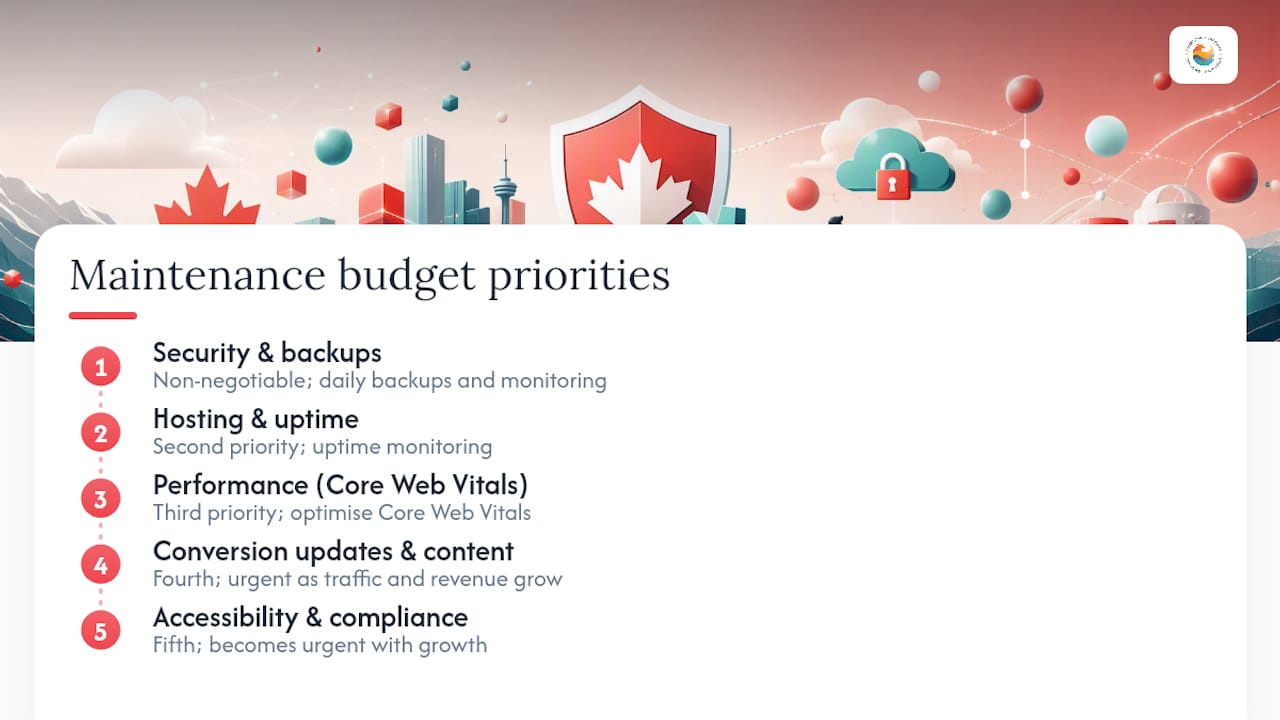
The priority order for budget allocation is this: first, security and backups; second, hosting quality and uptime monitoring; third, performance optimisation targeting Core Web Vitals; fourth, conversion-critical updates and content; fifth, accessibility and compliance. Most small businesses can cover the first three adequately on a Basic or Professional plan. The fourth and fifth become more urgent as traffic and revenue grow.
The signal to upgrade tiers is usually one of three things: a checkout failure that costs you a sale, a Google Search Console warning that drops your rankings, or a compliance notice. Do not wait for those events. The upgrade threshold is lower than most people think. If your site generates consistent monthly leads or revenue, a Professional plan is the right baseline, not a luxury.
What most articles on this topic understate is the compounding value of a maintained site over time. A site that has been consistently patched, audited, and optimised for two years outperforms a neglected site on every metric that matters: speed, security, rankings, and conversion rate. The monthly retainer is not just maintenance. It is compounding investment in your most important digital asset.
Marketing Guardians’ managed maintenance plan: what you get from day one
If you want a managed plan without the overhead of coordinating a freelancer or building an internal checklist, Marketing Guardians’ subscription-based maintenance is built for exactly that. Small and medium Canadian businesses get a predictable monthly cost, a defined scope, and a team that already knows how to connect technical site health to SEO performance, so your maintenance investment supports your broader marketing goals rather than sitting in a silo.

In your first 30 days, Marketing Guardians completes a full site inventory, establishes a security and performance baseline, applies any outstanding critical patches, and sets up automated backup and monitoring. You receive a written baseline report before month two begins. From there, monthly reporting keeps you informed without requiring you to manage the technical details yourself.
To get a scoped quote, share your site URL, hosting provider, CMS platform, approximate monthly traffic, and whether you process payments online. Marketing Guardians returns a proposal within two business days. Visit the website security and maintenance plan page to request pricing or a site health check.
Sources
The following standards and references informed the recommendations in this article:
FAQ
What is a website maintenance plan?
A website maintenance plan is a documented schedule of recurring security, backup, performance, content, and compliance tasks, each with a defined frequency and assigned owner, designed to keep a site secure, fast, and functional.
How much does it cost to pay someone to maintain a website in Canada?
Managed website maintenance in Canada typically costs $49–$149 CAD/month for a Basic plan, $150–$299/month for a Professional plan, and $300–$600+/month for Premium plans covering high-traffic or ecommerce sites, plus applicable GST or HST.
What should a website maintenance plan include?
A plan should include security patching, automated backups with restore testing, uptime monitoring, CMS and plugin updates, broken-link checks, Core Web Vitals reviews, form and checkout testing, content freshness checks, and periodic accessibility and compliance audits.
How often does a website need maintenance?
Core tasks like uptime monitoring and backups run daily or weekly automatically; plugin and CMS updates, performance checks, and form testing run monthly; accessibility audits and compliance reviews run quarterly; and a full security and content audit runs annually.
Can Marketing Guardians handle maintenance for WordPress and Shopify sites?
Yes. Marketing Guardians’ subscription-based maintenance plans cover WordPress, WooCommerce, and Shopify, with scope for custom applications confirmed during onboarding, and all plans include monthly reporting and Canadian time-zone support.
Recommended

AI search is changing fast. Download our Playbook to make sure you keep up.
Inside our AI Search and GEO Playbook, you’ll find a readiness checklist and a few copy-and-paste building blocks:
- Add Organization, Person, and Service schema to your About and Services pages.
- Add a short FAQ to your top service page with two or three real customer questions.
Small changes like these help AI systems understand who you are, what you do, and when to reference you.
Where to start if you feel behind? Just begin with one page - one question - one clear answer. Then open the Playbook and pick the next small step. Consistency beats intensity here. Your future self will be glad you started this month.


